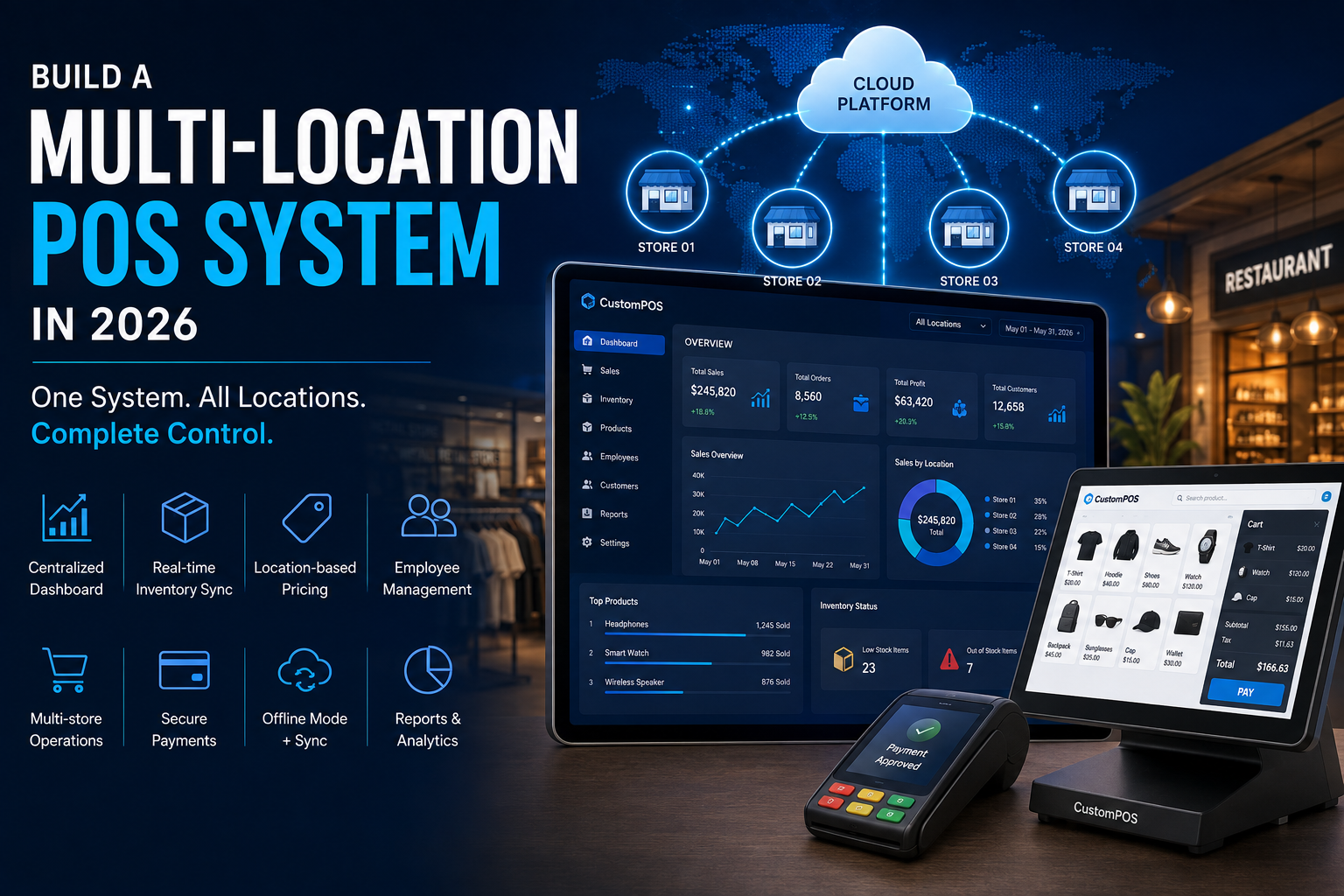
Managing one store with a basic billing system is relatively simple.
Managing 10, 50, or 500 locations is a completely different challenge.
Multi-location businesses need more than billing software. They need a centralized system that can synchronize sales, inventory, products, employees, customers, payments, pricing, and reports across every location.
This is why businesses are increasingly investing in custom POS software development designed specifically for multi-store operations.
A modern multi-location POS system can connect stores, warehouses, online channels, payment systems, and management dashboards into a single business ecosystem.
In this guide, we explain how to build a multi-location POS system in 2026, the essential features it should include, the technology architecture behind it, and the factors that influence development cost.
What Is a Multi-Location POS System?
A multi-location POS system is point-of-sale software that allows businesses to manage multiple stores, branches, restaurants, warehouses, or outlets from one centralized platform.
Instead of maintaining separate POS databases for every location, businesses can connect their operations through a centralized system.
A typical architecture looks like:
Store POS → Cloud Platform → Central Database → Management Dashboard
Each location can continue handling its daily operations while authorized managers and business owners can access consolidated information.
For example, a retail company with 20 stores can monitor:
- Sales by location
- Inventory by store
- Employee performance
- Product movement
- Customer activity
- Payment transactions
- Returns and refunds
- Store-level profitability
The CustomPOS platform already positions multi-store management around centralized control, unified reporting, real-time synchronization, and location analytics.
Why Businesses Need Multi-Location POS Software
As a business expands, operational complexity increases.
A single-store POS may no longer be enough when a company has:
- Multiple branches
- Central warehouses
- Different pricing by location
- Large employee teams
- Multiple payment methods
- Online and offline sales
- Franchise operations
- Multiple inventory locations
Using disconnected POS systems can create problems such as:
- Duplicate data
- Inventory inaccuracies
- Delayed reporting
- Manual reconciliation
- Inconsistent pricing
- Poor visibility
- Difficult employee management
A centralized POS system can bring these processes together.
10 Essential Features of a Multi-Location POS System
1. Centralized Dashboard
The most important feature is centralized management.
Business owners should be able to see the performance of all locations from one dashboard.
A centralized dashboard can display:
- Total sales
- Orders
- Revenue
- Inventory
- Best-selling products
- Returns
- Staff performance
- Location comparisons
Instead of opening individual store reports, management gets one unified view of the business.
2. Real-Time Inventory Synchronization
Inventory becomes significantly more complicated when a business operates multiple locations.
A product sold in one store should be reflected in the appropriate inventory records.
A modern POS system can track:
Purchase → Warehouse → Store → Sale → Inventory Update
This helps businesses understand where products are available and where stock needs to be replenished.
Important inventory features include:
- Real-time stock tracking
- Low-stock alerts
- Stock transfers
- Purchase orders
- Supplier management
- Multi-warehouse inventory
- Product variants
- Batch tracking
CustomPOS already lists inventory tracking, purchase orders, supplier management, and multi-warehouse support among its POS capabilities.
3. Location-Based Pricing
Different stores may operate in different markets.
A business might need:
- Location-specific pricing
- Regional promotions
- Store-level discounts
- Different tax configurations
- Local product availability
A custom POS can allow administrators to manage pricing centrally while still providing location-specific controls.
4. Centralized Product Management
Businesses should not have to update product information individually at every store.
A centralized product catalog can manage:
- Product names
- SKUs
- Barcodes
- Categories
- Prices
- Images
- Variants
- Tax settings
- Inventory rules
When a product changes, authorized administrators can distribute the update across relevant locations.
5. Employee and Role Management
Different employees require different levels of access.
For example:
Super Admin → Regional Manager → Store Manager → Cashier
Each role can have different permissions.
A cashier might process sales but have no access to financial reports.
A store manager could view store-level reports.
A regional manager could manage multiple locations.
The administrator could access the entire organization.
Role-based access control helps businesses maintain better operational security.
6. Unified Sales Reporting
A multi-location POS system should make it easy to compare locations.
Management can analyze:
- Daily sales
- Weekly sales
- Monthly revenue
- Average order value
- Number of transactions
- Best-selling products
- Returns
- Discounts
- Payment methods
- Staff performance
This allows businesses to identify high-performing and underperforming locations.
7. Offline POS Mode
Internet connectivity is not always reliable.
A store should not necessarily stop accepting customers simply because its internet connection goes down.
An offline-enabled POS can allow staff to continue selected operations locally and synchronize data when connectivity returns.
A simplified process is:
Internet Available → Cloud Sync
Internet Lost → Local Operation
Internet Restored → Automatic Synchronization
Offline functionality is particularly important for retail stores, restaurants, warehouses, and businesses operating in areas with inconsistent connectivity.
CustomPOS specifically promotes cloud-based POS with offline capabilities.
8. Payment Integration
Modern POS systems need to support multiple payment methods.
Depending on the market and business model, integrations may include:
- Credit cards
- Debit cards
- Mobile wallets
- QR payments
- Contactless payments
- Gift cards
- Online payments
A custom POS can connect payment processing with order management and reporting.
This creates a smoother checkout experience while giving management better transaction visibility.
9. Customer Management and Loyalty
A multi-location POS can also become a centralized customer management platform.
Customer profiles can include:
- Purchase history
- Contact information
- Loyalty points
- Rewards
- Preferences
- Discounts
- Store activity
This allows businesses to create loyalty programs that work across multiple locations.
For example, a customer could earn points at one store and redeem them at another location.
10. Analytics and Business Intelligence
The POS should not simply record transactions.
It should help management understand the business.
Analytics can identify:
- Best-performing stores
- Slow-moving products
- Peak sales periods
- Customer purchasing patterns
- Inventory trends
- Employee performance
- Product profitability
AI can further enhance this layer by helping businesses forecast demand and identify unusual sales patterns.
Multi-Location POS for Restaurants
Restaurants have unique POS requirements.
A restaurant POS may need:
- Table management
- Menu management
- Kitchen display systems
- Order routing
- KOT management
- Modifiers
- Split billing
- Discounts
- Tips
- Delivery orders
- Online ordering
- Staff management
For restaurant groups, centralized management becomes even more important.
Head office can manage menus, pricing, promotions, and reporting while individual restaurants handle daily orders.
CustomPOS currently supports restaurant POS functionality including kitchen display, table management, order tracking, and staff management.
Multi-Location POS for Retail
Retail businesses have a different set of priorities.
A retail POS system can include:
- Barcode scanning
- Product catalog
- Inventory management
- Customer loyalty
- Returns
- Purchase orders
- Supplier management
- Multi-store inventory
- Sales analytics
- Multiple payment methods
The system should provide centralized control without making individual stores dependent on constant head-office intervention.
Cloud POS Architecture
A cloud-based architecture is particularly useful for multi-location businesses.
A simplified architecture can look like:
Store 1 POS
↓
Store 2 POS
↓
Store 3 POS
↓
Store N POS
↓
Cloud API Layer
↓
Central Database
↓
Admin Dashboard
This architecture allows information from different locations to be synchronized with centralized services.
Cloud infrastructure can also support remote access, backups, analytics, and centralized system management.
Real-Time Synchronization
Synchronization is one of the most technically important parts of multi-location POS development.
Consider a product with only five units available.
If:
- Store A sells two
- Store B sells one
- Store C receives two
The central system needs to maintain accurate inventory information.
A synchronization architecture should account for:
- Concurrent transactions
- Network interruptions
- Duplicate requests
- Conflicting updates
- Offline transactions
- Data recovery
- Transaction ordering
Poor synchronization can result in inventory discrepancies and incorrect reports.
Therefore, synchronization should be considered during architecture design—not added at the end.
Multi-Store POS Security
A POS system contains valuable business information.
Security should protect:
- Customer information
- Employee accounts
- Sales records
- Payment-related information
- Inventory data
- Business reports
- Administrative functions
Security measures can include:
- Role-based access
- Strong authentication
- Encryption
- Secure APIs
- Audit logs
- Access monitoring
- Secure backups
- Regular security testing
Payment-related functionality should also be designed with applicable security and compliance requirements in mind.
Integrating a POS With Other Business Systems
A modern POS rarely operates independently.
Businesses may want to connect it with:
Accounting Software
Automatically synchronize sales and financial information.
CRM
Connect customer profiles and purchasing behavior.
ERP
Synchronize inventory, purchasing, suppliers, and financial processes.
eCommerce
Synchronize online and physical store inventory.
Payment Gateways
Process card and digital payments.
Shipping Platforms
Connect orders with fulfillment and delivery.
Marketing Platforms
Use customer and transaction data for targeted campaigns.
Custom POS development is especially valuable when businesses need integrations that aren’t available in standard POS packages.
AI-Powered Multi-Location POS
AI is changing what businesses expect from POS software.
Instead of simply displaying historical reports, future-ready POS platforms can provide intelligent insights.
For example:
Historical Sales + Current Inventory + Seasonal Data → AI Forecast → Suggested Inventory Level
AI-powered POS features can include:
- Sales forecasting
- Demand prediction
- Inventory recommendations
- Customer segmentation
- Product recommendations
- Fraud/anomaly detection
- Automated reporting
- Intelligent staff planning
The objective should not be adding AI simply for marketing.
AI should solve a measurable business problem.
IoT and POS Integration
POS systems can also connect with IoT devices.
For example:
POS → IoT Sensors → Store Data → Cloud → Analytics
Businesses could use connected devices for:
- Temperature monitoring
- Smart shelves
- Equipment monitoring
- Footfall measurement
- Energy monitoring
- Smart inventory systems
This can create a broader connected retail or hospitality ecosystem.
Technology Stack for Multi-Location POS Development
The technology stack depends on the product requirements.
A modern POS may use:
Frontend
- React
- Angular
- Flutter
- Electron
Backend
- Node.js
- Python
- Java
- Laravel
- ASP.NET
Database
- PostgreSQL
- MySQL
- MongoDB
Cloud
- AWS
- Microsoft Azure
- Google Cloud
Integrations
- Payment gateways
- Accounting platforms
- CRM systems
- ERP systems
- eCommerce platforms
The right stack should be selected according to scalability, performance, device requirements, integrations, security, and maintenance needs—not simply popularity.
How Much Does Multi-Location POS Development Cost?
There is no single price for custom POS software.
The cost depends on:
- Number of locations
- Number of POS terminals
- Mobile requirements
- Web dashboard
- Inventory complexity
- Payment integrations
- Hardware integrations
- Offline functionality
- Cloud architecture
- AI requirements
- Third-party integrations
- Security requirements
- Reporting requirements
A basic multi-store POS may require significantly less investment than an enterprise platform supporting hundreds of locations and complex integrations.
The best approach is to define the MVP first and then build additional capabilities in phases.
Custom POS vs Ready-Made POS
| Feature | Custom POS | Ready-Made POS |
|---|---|---|
| Business workflows | Tailored | Standard |
| Multi-location support | Customizable | Depends on vendor |
| Integrations | Flexible | Limited to available integrations |
| Reporting | Business-specific | Standard reports |
| Inventory | Custom workflows | Predefined |
| Offline operation | Can be designed | Depends on product |
| Scalability | Designed around business | Vendor-dependent |
| Ownership | Greater control | Vendor-controlled |
| Future features | Custom roadmap | Vendor roadmap |
The right choice depends on business requirements, budget, timeline, and long-term growth plans.
When Should a Business Build a Custom POS?
Custom POS development makes particular sense when:
- Existing POS software limits your workflow
- You operate multiple locations
- You need specialized inventory management
- You require unique integrations
- You need custom reporting
- You want complete control over the product roadmap
- Your business is scaling rapidly
- You want to integrate POS with existing enterprise software
If a business has to constantly change its operations to accommodate the limitations of its POS, it may be time to consider a custom solution.
How CustomPOS Developers Can Help
CustomPOS Developers builds POS solutions for retail, restaurants, multi-store businesses, and enterprise operations.
Its current solution portfolio includes:
- Retail POS
- Restaurant POS
- Multi-store POS
- Cloud POS
- Inventory management
- Analytics and reporting
- Payment integration
- CRM and ERP integration
- Custom development
- System integration
- Maintenance and support
The platform emphasizes centralized management, real-time synchronization, cloud infrastructure, offline capabilities, and scalable architecture.
Frequently Asked Questions
What is a multi-location POS system?
A multi-location POS system allows businesses to manage sales, inventory, employees, customers, payments, and reports across multiple stores or locations from a centralized platform.
Can a multi-store POS work offline?
Yes. A properly designed POS can support offline operations and synchronize transactions when the internet connection is restored.
Can one POS system manage multiple stores?
Yes. A centralized multi-location POS can manage multiple stores while allowing each location to operate according to its specific requirements.
Can POS inventory be synchronized between stores?
Yes. Multi-location POS software can synchronize inventory and support stock transfers between stores and warehouses.
Can a POS system integrate with accounting software?
Yes. Custom POS platforms can integrate with accounting, ERP, CRM, eCommerce, payment, and other business systems through APIs and connectors.
Is cloud POS better for multiple locations?
Cloud-based POS can make centralized management, remote access, synchronization, backups, and reporting easier for multi-location businesses. The appropriate architecture still depends on connectivity, offline requirements, security, and business needs.
How long does it take to develop a multi-location POS?
The timeline depends on the number of features, integrations, locations, hardware requirements, security requirements, and testing scope. A focused MVP can be developed faster than a full enterprise POS platform.
The Future of Multi-Location POS
The POS system of the future will be much more than a checkout terminal.
It will connect:
Stores + Customers + Inventory + Payments + Employees + Cloud + AI + IoT + eCommerce
Businesses will increasingly expect their POS to provide real-time information and intelligent recommendations rather than simply record transactions.
For growing retailers, restaurants, franchises, and enterprise chains, a scalable POS can become the central operating system for the business.
Final Thoughts
Building a multi-location POS system requires careful planning.
The goal is not simply to create another billing application.
A successful system should connect locations, synchronize information, simplify inventory management, provide actionable analytics, support secure payments, and give business owners centralized control.
Whether you operate three stores or plan to expand to hundreds, the architecture should be designed around your growth strategy.
Custom POS software gives businesses the flexibility to build the workflows, integrations, and features they actually need.
If your current POS is limiting your growth, a custom multi-location POS platform may be the next step toward a more connected, scalable, and efficient business.
Comments